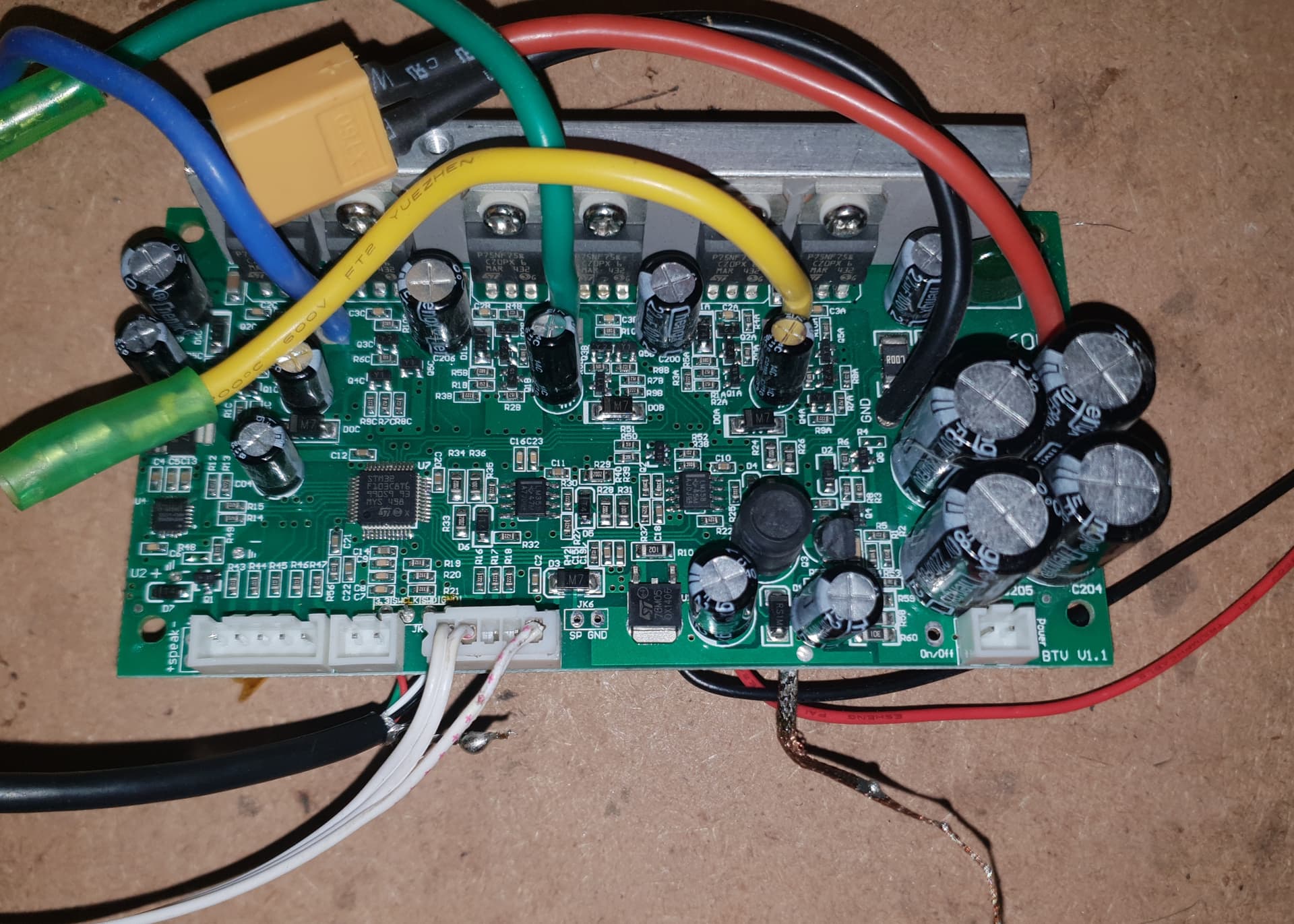
Is it possible to use inverted low input with simple foc?

I have a monowheel for which I am trying to write code. It uses IRS2108 as half-bridge driver. It’s high input is in phase but low input is inverted. Can I use simple foc to control it? How should I set it up? Existing setup with schematics: GitHub - Suresh-Subedi/sologear-g3-15-electric-unicycle: Sologear G3-15 Electric Unicycle reverse engineering to reuse motherboard with custom firmware

I used 6pwm and it just blocks the wheel/ makes the wheel resist when I manually try to turn the wheel.

Hi @Suresh_Subedi ,

Which MCU type are you using? Its a new feature for us, implemented on the dev branch and will be part of the next release. So far, we support it on most STM32 MCUs and the RP2040.

You can set it via the build-flag -DSIMPLEFOC_PWM_LOWSIDE_ACTIVE_HIGH=false

Hi @runger, I’m using STM32F103C8T6.

Ok, that’s great, so you could use the dev branch from GitHub and try it out :slight_smile:

Or you can wait for the next release, then it will be part of the released library…

Hi

I have a very similar board from a single wheel gyro , using a STM32F103C8T6 and a MPU6050.
I’m puzzled, I don’t know where to start, by the past I was able to play With Feru’github “hoverboard hack” , I also modify some C lines to add extra features.
I’m an electronics with good knowledge in transistor but each time a component got’s more than 3 pins… I’m lost :slight_smile:

so yes…
I downloaded library by platformIO “wizard”, and compile exemple for Suresh’s git.
I happy to see a led blinking, at least the tool chain is operationnal.
Now I have to read a little … documentation…

so after a small correction , my board correctly report shaft position with leds.

#include <SimpleFOC.h>

int polePairs = 15;
int encA = PA0; // HallSensor A pin
int encB = PA1;
int encC = PA2;

int led1 = PA15;
int led2 = PB4;
int led3 = PB5;
int led4 = PB8;
int leds[] = { led1, led2, led3, led4 };

// Hall sensor instance
// HallSensor(int hallA, int hallB , int hallC, int pp)
//  - hallA, hallB, hallC    - HallSensor A, B and C pins
//  - pp                     - pole pairs
HallSensor sensor = HallSensor(encA, encB, encC, polePairs);

// Interrupt routine intialisation
// channel A and B callbacks
void doA() { sensor.handleA(); }
void doB() { sensor.handleB(); }
void doC() { sensor.handleC(); }

// BLDCMotor motor = BLDCMotor(polePairs);

void ledOn () {
  digitalWrite(led2, LOW);
}
void ledOff () {
  digitalWrite(led2, HIGH);
}

void displayAngle(float angle) {
  if (angle <2*PI && angle >3*PI/2) {
    digitalWrite(led4, LOW);
  }
  else digitalWrite(led4, HIGH);

  if (angle >PI && angle <3*PI/2) {
    digitalWrite(led3, LOW);
  }
  else digitalWrite(led3, HIGH);

  if (angle <PI && angle >PI/2) {
    digitalWrite(led2, LOW);
  }
  else digitalWrite(led2, HIGH);

  if (angle <PI/2 && angle >0) {
    digitalWrite(led1, LOW);
  }
  else digitalWrite(led1, HIGH);
 
}

void setup()
{
  char i;
  pinMode(led1, OUTPUT);
  pinMode(led2,OUTPUT);
  pinMode(led3,OUTPUT);
  pinMode(led4,OUTPUT);
  // use internal pullups
  sensor.pullup = Pullup::USE_INTERN;
  // initialize encoder sensor hardware
  sensor.init();
  sensor.enableInterrupts(doA, doB, doC);


  for ( i=0;i<4;i++)
    {
      digitalWrite(leds[i], HIGH);
    
    }
  for ( i=0;i<4;i++)
  {
    digitalWrite(leds[i], LOW);
    _delay(200);
    digitalWrite(leds[i], HIGH);
    _delay(200);
  }
  /*ledOn();
  _delay(5000);
  ledOff();*/

  // link the sensor to the motor
  //motor.linkSensor(&sensor);
  // link the driver to the motor
  //motor.linkDriver(&driver);
}

void loop()
{
  sensor.update();
  
  displayAngle(sensor.getAngle());
 // ledOn(  );
 // _delay(200);
 // ledOff();
  _delay(100);
}
1 Like

Great to hear that you have made progress. Thanks for sharing.

now I’m digging how to make that wheel rotating…

it isn’t a small piece, I must say.

regards

I’m even not able to know how to define may serial pins to monitor…

:rofl:

if someone, by accident , is patient enough to drive me…

regards

Mine looks like this:

  Serial.setRx(PC11);
  Serial.setTx(PC10);
  Serial.begin(115200);

thx, … I though about something like that.
the trick is… MCU is a STM32F103C8T6 , PC isn’t available.
the only free pins that could fit a USUART are for UART3 with PB10 PB11

so I setup Serial3.begin(9600) … but compiler isn’t happy,
I’m dead stupid in C++ and more with arduino… :frowning:

I think I found something,
by instanciating “HardwareSerial SerialDebug(USART3);”

it should work…

Yess! It works!

good, I can move forward with a monitor … I hope…

I have a large habit to work on small cpu in C or ASM , tinkering register directly…
but I’m totally lost with high level things such as C++

You probably don’t need to use the HardwareSerial class. Just replace the PC numbers from my previous post with your PB numbers and it should work. Serial, not Serial3.

I generally prefer hardware registers too. I don’t think I’ve ever used a library that didn’t torment me in some way. For example the other day I discovered that Arduino’s implementation of sprintf doesn’t support floating point… I’ve been printing my current values in integer milliamps instead. And it has no way to check if interrupts are currently enabled, even though there are functions noInterrupts() and interrupts() to disable/enable. Obviously you can make wrapper functions that keep track of it, but that’s no good for compatibility with code outside your own library/project.

The STM32 HAL library is one of the worst ever. So much clutter, and makes it more difficult instead of easier. For example my inline current sense ADC setup on G431 would probably be like 5-10 times this much HAL code… and you still have to study how the hardware works, and then study how to get the library to set it the way you want.

  RCC->AHB2ENR |= RCC_AHB2ENR_ADC12EN;
  RCC->CCIPR |= RCC_CCIPR_ADC12SEL_1; // ADC use SYSCLK
  ADC1->CR &= ~ADC_CR_DEEPPWD; ADC2->CR &= ~ADC_CR_DEEPPWD;
  ADC1->CR |= ADC_CR_ADVREGEN; ADC2->CR |= ADC_CR_ADVREGEN;
  delayMicroseconds(20); // Regulator startup time from STM32G431CB datasheet
  // Dual mode regular simultaneous, clock 170MHz/4 = 42.5MHz
  ADC12_COMMON->CCR = 6 | ADC_CCR_PRESC_1;
  ADC1->CR |= ADC_CR_ADEN; ADC2->CR |= ADC_CR_ADEN;
  while(!(ADC1->ISR & ADC_ISR_ADRDY)){} // Wait for ADC startup
  ADC1->CFGR = ADC2->CFGR = ADC_CFGR_CONT | ADC_CFGR_OVRMOD; // Convert continuously, ignore overrun
  ADC1->CFGR2 = ADC2->CFGR2 = ADC_CFGR2_ROVSE | ADC_CFGR2_OVSR_2 | ADC_CFGR2_OVSR_1 |
    ADC_CFGR2_OVSS_1 | ADC_CFGR2_OVSS_0; // 128x oversampling, shifted down by 3
  ADC1->SQR1 = ADCSQ(1,10); // Phase C
  ADC2->SQR1 = ADCSQ(1,1); // Phase B
  ADC1->CR |= ADC_CR_ADSTART;

thx.

I think I found my mystake, and global understanding.

I declared HardwareSerial SerialDebug(USART3); and replaced every mention to a "serial"something with my SerialDebug

and now I have the following on my console :

23/07/2025 19:04:39.404 [RX] - hello word<CR><LF>
MOT: Monitor enabled!<CR><LF>
TIM1-CH1 TIM1-CH1N TIM1-CH2 TIM1-CH2N TIM1-CH3 TIM1-CH3N score: 1<CR><LF>
STM32-DRV: best: TIM1-CH1 TIM1-CH1N TIM1-CH2 TIM1-CH2N TIM1-CH3 TIM1-CH3N score: 1<CR><LF>
STM32-DRV: Syncronising timers! Timer no. 1<CR><LF>
STM32-DRV: Restarting timer 1<CR><LF>
MOT: Init<CR><LF>
MOT: Enable driver.<CR><LF>
MOT: Align sensor.<CR><LF>
MOT: Failed to notice movement<CR><LF>
MOT: Init FOC failed.<CR><LF>
0.0000<HT>	0.0000<HT>	0.0000<HT>	0.0000<CR><LF>
hello word<CR><LF>
MOT: Monitor enabled!<CR><LF>
TIM1-CH1 TIM1-CH1N TIM1-CH2 TIM1-CH2N TIM1-CH3 TIM1-CH3N score: 1<CR><LF>
STM32-DRV: best: TIM1-CH1 TIM1-CH1N TIM1-CH2 TIM1-CH2N TIM1-CH3 TIM1-CH3N score: 1<CR><LF>
STM32-DRV: Syncronising timers! Timer no. 1<CR><LF>
STM32-DRV: Restarting timer 1<CR><LF>
MOT: Init<CR><LF>
MOT: Enable driver.<CR><LF>
MOT: Align sensor.<CR><LF>
MOT: Failed to notice movement<CR><LF>
MOT: Init FOC failed.<CR><LF>
0.0000<HT>	0.0000<HT>	0.0000<HT>	0.0000<CR><LF>

23/07/2025 19:06:31.644 [RX] - 0.0000<HT>	0.0000<HT>	0.0000<HT>	0.0000<CR><LF>
0.0000<HT>	0.0000<HT>	0.0000<HT>	0.0000<CR><LF>


so ... it's not so bad...

I didn't activated the voltage for half bridges because I don't want to smoke my board right away. 
are there some low level function to check hardware before processing power?, such as "sensor logic level monitor" or "hbridge test" or "current sensor qualibration"?

meanwhile I'll ding into the documentation

best regards

before closing the “high power switch” on the board, I checked the power part with my lab PSU, with a current limit. Motor isn’t connected.
For test purpose I used the " BLDC driver standalone example" , with some adaptation …
it was a good idea, immediatly after initialisation was complete, PSU exihitbit a current limit light … saying that “something goes wrong”…
I can see with my scope PWM with a deadtime, so everything is OK with that… unless polarity isn’t the good one…

scratching my head, and starting a small reverse job

best regards

guess what.
to activate high side mosfet an high level is required…
but to active low side one, a low level is required.
so , I have exactly the same issue as Suresh :sweat_smile:

so, I added #define SIMPLEFOC_PWM_LOWSIDE_ACTIVE_HIGH false

at the begining of main.cpp … clean project and rebuild…
… but polarity don’t change! :thinking:

what’s wrong…

a funny fact … I cannot find reference for SIMPLEFOC_PWM_LOWSIDE_ACTIVE_HIGH elsewhere than hardware_api.h…
strange

do you have a clue?

regards

All I can say is that it is possible. The hardware register TIM1_CCER has independent polarity selection for each channel (including complementary channels).

scratching my head…