Beginner's question(s) on the BGC 3.1 controller

Hi everyone, I hope you’re doing well

I’m kinda new to the bldc motor/controller world and I’ve come across a simplefoc ytb video controlling the position of a bldc motor with a gimball controller. I would like to do the same with this controller.

Firstly the documentation says that this board is compatible with the simplefoc library but I don’t quite understand how to speak with it, is it considered as an arduino ? I would just plug the usb cable, send the code through the arduino IDE and use serial communication to control it ? Secondly , how to know the pins used by the board, because the BLDCDriver3PMW class requires the 3 motor pins, are they always 9,10,11 ?

Thank you for your answers, have a nice day

Hello @Julien

Welcome to the board.

Could you lease post a link to the actual documentation? What you posted is just an aliexpress sales link.

Thanks,
Valentin

Hello @Valentine ,

Here is the doc: BLDC drivers | Arduino-FOC,

3rd row of the second table.

Thanks,
Julien

Hi, and welcome @Julien ,

This is one of the many Storm32 BGC clones… it is not an “Arduino”, but its STM32 MCU is “Arduino compatible” in the sense that there exists a (well tested much used) Arduino framework binding for this MCU, and so you can program it with Arduino IDE.

Normally these boards come unfleshed or flashed with an old version of the Storm32 firmware. So to use it with SimpleFOC, first you have to flash a normal firmware using the SWD connections and a ST-Link. Alternatively you can use the serial connections and a serialTTL2USB dongle, manually putting the board into boot mode.
After this you can probably use USB to flash it.

The board has I2C routed out, but if you want to use SPI you will have to do some soldering.

In the end you have to verify the pinout using a multi-meter… here’s a pinout diagram of a similar board to get you started:

The pinout for SPI is generally something like this:

Hi @runger,
Thank you for your explanations,

Where can I find the firmware ? I think I’ll use the USB dongle since the board does not have easy access SWD pins.

For the communication, I told you about serial because , from the video I saw, I thought the computer communicated with the board through the arduino serial window by the usb port.

Thank you for the time you take to answer me
Have a nice day,
Julien

Download the STM32CubeProgrammer, a free utility from ST-Micro…

I think you can use this Bootloader: GitHub - Serasidis/STM32_HID_Bootloader: Driverless USB HID bootloader and flashing tool for STM32F10X devices
Or one from ST-Micro. Don’t use the old Maple Bootloader.

There’s a video here describing in good detail how to flash a new Bootloader. It’s for BluePill boards, but the concepts apply directly to the storm32 as well.

Edit: I just checked my notes on flashing the Storm32 - one of the boards I was trying to flash didn’t work until I discovered Read Protection was set. This prevents flashing. I switched it off (in the OB tab in CubeProgrammer) and it flashed the new Bootloader right away.

Did you have any luck with this board? I have a similar one arriving soon.

Just recieved my “BGC 3.1” that looks like the one in the original link. The chip is an Atmel mega328. I’ll post back once i try to play with it.

Hello Nate,
Sorry for the late response, unfortunately I abandonned the idea of using this board, my knowledge in this field is quite limited and from my previous exchange, using this board seemed to be over my capabilities due to the “flashing firmware” part. Please keep me updated if you have any luck !
Have a nice day

Hi everyone,

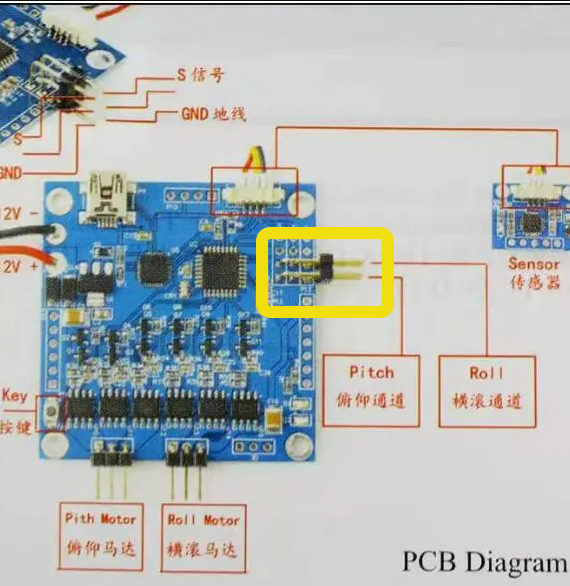
i am trying this board…i have flashed it already…do i need to add any jumpers here on yellow highlighted pins?

Hi, welcome to the forum.
This board doesn’t have much in common with the Storm32. It looks more like an Atmel 328p processor? I’m in doubt, that you will be able to run simpleFOC on it. Without the option to add position feedback sensors it won’t make much sense trying, either.

To answer your question: you can send servo-compatible PWM signals through these pins in addition to the IMU sensor.

Hi @hs307 , welcome to SimpleFOC!

This looks like a BGC3.1 clone. You can run SimpleFOC on it, but the MCU is not really fast enough for 2 motors. Still, you can try and if you don’t need great performance it can work.

There are some threads in our forum on making it work, search for “BGC3”, and look at the wiring diagrams in this thread, above.

You don’t need to add any jumpers on these pins. Which sensors are you using on the motors?

Thank you Olaf!
Yes, that’s correct, it is ATmel328p. I used ‘Arduino Pro or Pro mini’ for the board to flash it. After flashing, when i connect a motor with target_velocity of 0 it stays the position but gets very hot. When i do target velocity of 5, it is just vibrating the motor. So, I think you are right, it does not seem to work correctly. I will place this board in my Ali Express souvenir collection box.

By the way, I also tried this another board FOC bldc driver controller SimpleFOC Shield brushless motor engine board MKS ESP32 FOC Servo Drive Mechanical Robot Dog parts - AliExpress 7 which claims to be designed for ‘SimpleFOC’. When I flash it, It does rotate my BLDC motor as per the set target_velocity but as soon as i send a message through ‘Serial monitor’, it shows uart disconnected message to me. So, I thought it might be to do with Arduino IDE trying to do flashing and serial both from the same window. I tried out SimpleFOC Studio for serial connection which gives this error:
C:\Users\me\anaconda3\envs\simplefoc\lib\site-packages\serial\serialwin32.py", line 317, in write
raise SerialException(“WriteFile failed ({!r})”.format(ctypes.WinError()))
serial.serialutil.SerialException: WriteFile failed (PermissionError(13, ‘Access is denied.’, None, 5))

My assumption is that its the same error as Arduino IDE. The serial port is not available somehow for sending messages. After that, flashing also gives error 2. I then have to disconnect my motor, reset the board and it starts flashing again.

Here is my code…

/// MKS ESP32 FOC Open loop speed control example; Test Library:SimpleFOC 2.1.1 ; Tested hardware:MKS ESP32 FOC V1.0
/// Enter "T+number" in the serial port to set the speed of the two motors.For example, to set the motor to rotate at a speed of 10rad/s, input "T10"
/// When the motor is powered on, it will rotate at 5rad/s by default
/// When using your own motor, do remember to modify the default number of pole pairs, the value in BLDCMotor(7).
/// The default power supply voltage of the program is 12V.
/// Please remember to modify the voltage_power_supply , voltage_limit variable values when using other voltages for power supply

#include <SimpleFOC.h>

BLDCMotor motor = BLDCMotor(7);                               //According to the selected motor, modify the number of pole pairs here, the value in BLDCMotor()
BLDCDriver3PWM driver = BLDCDriver3PWM(32,33,25,22);
  
/// BLDC motor & driver instance
BLDCMotor motor1 = BLDCMotor(7);                              //Also modify the value in BLDCMotor() here
BLDCDriver3PWM driver1  = BLDCDriver3PWM(26,27,14,12);

/// Target Variable
float target_velocity = 5;

/// Serial Command Setting
Commander command = Commander(Serial);
void doTarget(char* cmd) { command.scalar(&target_velocity, cmd); }

void setup() {
  

  driver.voltage_power_supply = 12;                   //According to the supply voltage, modify the value of voltage_power_supply here
  driver.init();
  motor.linkDriver(&driver);
  motor.voltage_limit = 1;   // [V]                   //According to the supply voltage, modify the value of voltage_limit here
  motor.velocity_limit = 40; // [rad/s]
  
  driver1.voltage_power_supply = 12;                  //Also modify the value of voltage_power_supply here
  driver1.init();
  motor1.linkDriver(&driver1);
  motor1.voltage_limit = 3;   // [V]                  //Also modify the value of voltage_limit here
  motor1.velocity_limit = 40; // [rad/s]

 
  // Open Loop Control Mode Setting
  motor.controller = MotionControlType::velocity_openloop;
  motor1.controller = MotionControlType::velocity_openloop;

  // Initialize the Hardware
  motor.init();
  motor1.init();


  // Add T Command
  // Enter "T+number" in the serial port to set the speed of the two motors.For example, to set the motor to rotate at a speed of 10rad/s, input "T10".
  command.add('T', doTarget, "target velocity");

  Serial.begin(115200);
  Serial.println("Motor ready!");
  Serial.println("Set target velocity [rad/s]");
  _delay(1000);
}

void loop() {
  motor.move(target_velocity);                    //When the motor is powered on, it will rotate at 5rad/s by default
  motor1.move(target_velocity);

  //User Newsletter
  command.run();
}

I tried both 1 and 3 for target voltage. My motor is actually a 12v motor but it suggests to keep it way below its actual 1amp capacity.

No sensors - i am connecting the motor without any encoder sensors. Simply connecting 3 phase wires.

Any suggestion?

Disclaimer: I am a newbie, not an expert :slight_smile:

Hi @runger - Noticed your message just now. So, i dont quite need to place the board in my souvenir collection as yet? I am going to run only 1 motor. As mentioned in my previous reply, its flashed, motor vibrates when velocity is set to 5 and motor is still when velocity is set to 0. No response when i send serial commands. By the way, it has uart pins and also connects the mini usb. I am assuming that it accepts serial commands via mini usb…is that right? or should i send commands via its socket marked uart? For this board my code is as below

// Open loop motor control example
#include <SimpleFOC.h>


// BLDC motor & driver instance
// BLDCMotor motor = BLDCMotor(pole pair number);
BLDCMotor motor = BLDCMotor(7);
// BLDCDriver3PWM driver = BLDCDriver3PWM(pwmA, pwmB, pwmC, Enable(optional));
BLDCDriver3PWM driver = BLDCDriver3PWM(9, 5, 6, 8);

// Stepper motor & driver instance
//StepperMotor motor = StepperMotor(50);
//StepperDriver4PWM driver = StepperDriver4PWM(9, 5, 10, 6,  8);


//target variable
float target_velocity = 5;

// instantiate the commander
Commander command = Commander(Serial);
void doTarget(char* cmd) { command.scalar(&target_velocity, cmd); }
void doLimit(char* cmd) { command.scalar(&motor.voltage_limit, cmd); }

void setup() {

  // driver config
  // power supply voltage [V]
  driver.voltage_power_supply = 12;
  // limit the maximal dc voltage the driver can set
  // as a protection measure for the low-resistance motors
  // this value is fixed on startup
  driver.voltage_limit = 6;
  driver.init();
  // link the motor and the driver
  motor.linkDriver(&driver);

  // limiting motor movements
  // limit the voltage to be set to the motor
  // start very low for high resistance motors
  // currnet = resistance*voltage, so try to be well under 1Amp
  motor.voltage_limit = 3;   // [V]
 
  // open loop control config
  motor.controller = MotionControlType::velocity_openloop;

  // init motor hardware
  motor.init();

  // add target command T
  command.add('T', doTarget, "target velocity");
  command.add('L', doLimit, "voltage limit");

  Serial.begin(115200);
  Serial.println("Motor ready!");
  Serial.println("Set target velocity [rad/s]");
  _delay(1000);
}

void loop() {

  // open loop velocity movement
  // using motor.voltage_limit and motor.velocity_limit
  motor.move(target_velocity);

  // user communication
  command.run();
}

I tried this test sketch on ESP32 now. It works. Velocity 5 or 10. Both motors are running.

No, well, its not the perfect board, but it can be made to work…

I looked at some of my old sketches (its been 2 years or more I think since I used this board last) and they’re all just using the standard “Serial”, no special settings.
So I think Serial should work. I honestly can’t remember if I was using the USB, but I suppose yes. Have you checked if it is showing up as a COM port at all?

I think the first thing to do is to get Serial working so you can debug and send commands…

thanks. Allowing you to change velocity via serial?

@runger - yes the COM port is appearing - letting me upload new sketch. However, nothing happens in ‘serial monitor’ window. Whatever i enter e.g., T10 or T5, it disappears.

Hi everyone, thank you for your help. The issue was doing my head in but finally the motor spun!

Just FYI in case if anyone like me - new to the Arduino - facing this issue where motor is humming but not spinning with this example code, mine resolved by changing PWM pins to “BLDCDriver3PWM(11, 10, 9, 8);” Before, it was (9, 5, 6, 8).

Its now working with both position and velocity. I have now one last question:

Even when I set position to “T0” the motor gets hot. I suppose it is because its working to stay on the zero position. I actually want to stop the motor and cut the power off - any way to do it?

If you are using the commander, you can set motor voltage limit to zero. If you are running in open_loop it is a good idea to use 1V voltage limit or less.