Hi, I’m looking to build a velocity-controlled system with precise shaft angle measurement.
I have just got my hands on an iPower GM4108H-120T motor with their AS5048A housing, an STM32 Nucleo, and a SimpleFOCShield for the hardware. I managed to run the whole system perfectly fine in open-loop modes (velocity and position).
My main issue is in the AS5048A giving a lot of noise in the measurements, which causes the velocity measurement to jump up and down quite significantly. I am trying to understand if this kind of jitter is to be expected for this encoder and if going to something with more resolution (MT6835 - 21 bit) will help with the noise/jitter in the measurement
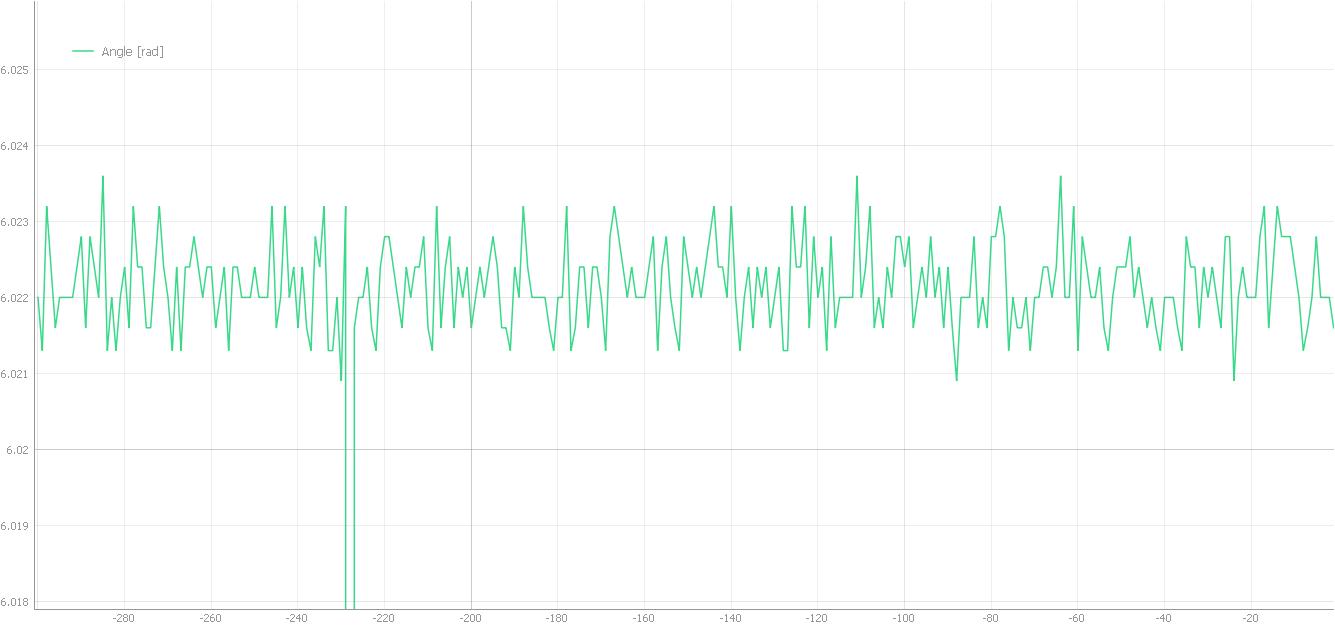
The value sometimes jumps to 0 periodically (you can see the out-of-range peak in the plot).
What can I do to improve the baseline reading for the sensor before applying filters?
My ideal scenario is to be able to get repeatable and accurate measurements in the 14-bit range. Ideally, I want to try using magnetic encoders first before giving up and moving on to other types of sensors.
My code for your reference:
/**
*
* Velocity motion control example
* Steps:
* 1) Configure the motor and magnetic sensor
* 2) Run the code
* 3) Set the target velocity (in radians per second) from serial terminal
*
*
* By using the serial terminal set the velocity value you want to motor to obtain
*
*/
#include <SimpleFOC.h>
// magnetic sensor instance - SPI
MagneticSensorSPI sensor = MagneticSensorSPI(AS5048_SPI, 10);
// magnetic sensor instance - MagneticSensorI2C
//MagneticSensorI2C sensor = MagneticSensorI2C(AS5600_I2C);
// MagneticSensorAnalog sensor = MagneticSensorAnalog(A1, 14, 1020);
//MagneticSensorPWM sensor = MagneticSensorPWM(3, 1000, 4119, 16, 4111);
//void doPWM(){sensor.handlePWM();}
// BLDC motor & driver instance
BLDCMotor motor = BLDCMotor(11);
BLDCDriver3PWM driver = BLDCDriver3PWM(9, 5, 6, 8);
// Stepper motor & driver instance
//StepperMotor motor = StepperMotor(50);
//StepperDriver4PWM driver = StepperDriver4PWM(9, 5, 10, 6, 8);
InlineCurrentSense current_sense = InlineCurrentSense(185.0f, A0, A2);
// velocity set point variable
float target_velocity = 0;
// instantiate the commander
Commander command = Commander(Serial);
void doTarget(char* cmd) { command.scalar(&target_velocity, cmd); }
void doMotor(char* cmd) { command.motor(&motor, cmd); }
void setup() {
// use monitoring with serial
Serial.begin(115200);
// enable more verbose output for debugging
// comment out if not needed
SimpleFOCDebug::enable(&Serial);
// initialise magnetic sensor hardware
sensor.init();
//sensor.enableInterrupt(doPWM);
// link the motor to the sensor
motor.linkSensor(&sensor);
// driver config
// power supply voltage [V]
driver.voltage_power_supply = 12;
driver.pwm_frequency = 32000; // set the pwm frequency to 20kHz
driver.init();
// link the motor and the driver
motor.linkDriver(&driver);
// link current sense and the driver
current_sense.linkDriver(&driver);
// set motion control loop to be used
motor.controller = MotionControlType::velocity;
// contoller configuration
// default parameters in defaults.h
// velocity PI controller parameters
motor.PID_velocity.P = 0.2f;
motor.PID_velocity.I = 20.0f;
motor.PID_velocity.D = 0;
// default voltage_power_supply
motor.voltage_limit = 12;
// jerk control using voltage voltage ramp
// default value is 300 volts per sec ~ 0.3V per millisecond
motor.PID_velocity.output_ramp = 1000;
// velocity low pass filtering
// default 5ms - try different values to see what is the best.
// the lower the less filtered
motor.LPF_velocity.Tf = 0.01f;
// comment out if not needed
motor.useMonitoring(Serial);
// current sense init and linking
current_sense.init();
motor.linkCurrentSense(¤t_sense);
// initialize motor
motor.init();
// align sensor and start FOC
motor.initFOC();
// add target command T
command.add('T', doTarget, "target velocity");
command.add('M',doMotor,"my motor");
Serial.println(F("Motor ready."));
Serial.println(F("Set the target velocity using serial terminal:"));
_delay(1000);
}
void loop() {
// main FOC algorithm function
// the faster you run this function the better
// Arduino UNO loop ~1kHz
// Bluepill loop ~10kHz
motor.loopFOC();
// Motion control function
// velocity, position or voltage (defined in motor.controller)
// this function can be run at much lower frequency than loopFOC() function
// You can also use motor.move() and set the motor.target in the code
motor.move(0);
// function intended to be used with serial plotter to monitor motor variables
// significantly slowing the execution down!!!!
motor.monitor();
// user communication
command.run();
}
That’s great! Thanks for reporting back on it!
– runger