Hi guys!
I’ve been investigating ESP32C6 recently. I’ve got one of th seedstudios XIAO boards.
And I’ve been encountering a strange issue, there are huge spikes in current measurement, velocity measurement and everything else. The motor stumbles each couple of seconds (2-3).
I tried to get to the bottom of this issue and it seems that it does not come from SimpleFOC. I was able to reproduce it even by just running an empty loop and measuring the time.
#include <Arduino.h>

void setup() {
  Serial.begin(115200);
  Serial.println("Hello, world!");
}

uint32_t last_time = 0;
uint32_t counter = 0;
uint32_t dtmax = 0;
void loop() {

    auto dt = micros() - last_time;
    last_time = micros();
    if (dtmax < dt ) dtmax = dt;

    if (counter++ > 100) {
        Serial.print(">dt: ");
        Serial.println(dtmax);
        dtmax = 0;
        counter = 0;
    }
}
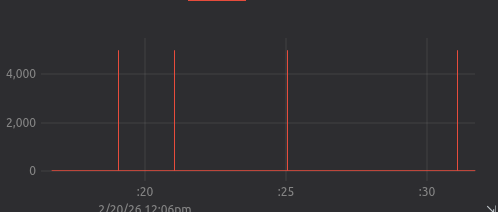
And I’ve got this:
(VIsualised with teleplot.fr)
The loop execution time goes from 30us to 5ms (5000us) for one brief moment.
Did someone have the same issue, can someone reproduce it with the code above?
Do you guys know where this could be coming from?
I tried to disable bluetooth and wifi but I still get the same issue.
btStop() and WiFi.mode(WIFI_OFF) and this did not change anything.
Basically this jitter makes the board unusable for FOC at the moment!!
1 Answer
1
Ok I found a solution or a workaround…
Seems like for c6 using loop is not a good option for SimpleFOC. If I use a higher priority task I dont have jitter any more:
#include <Arduino.h>

// Global variables for tracking
volatile uint32_t dtmax = 0;
uint32_t last_time = 0;
uint32_t counter = 0;

// This function will run as a high-priority task
void highPriorityTask(void *pvParameters) {
  last_time = micros();

  while (1) {
    uint32_t now = micros();
    uint32_t dt = now - last_time;
    last_time = now;

    // Track the maximum jitter/delay encountered
    if (dt > dtmax) {
      dtmax = dt;
    }

    // Every ~2000 iterations, print the result
    // We use a larger counter so Serial doesn't become the bottleneck
    if (counter++ > 2000) {
      Serial.print(">dt_max_us:");
      Serial.println(dtmax);
      dtmax = 0;
      counter = 0;
    }

    // Critical: Tell FreeRTOS to allow other tasks to breathe for 1 tick
    if(counter % 100 == 0) {
        vPortYield(); // can be long...
    }
  }
}

void setup() {
  // Use a high baud rate to minimize Serial buffer delays
  Serial.begin(921600);
  delay(1000);

  // Create the task:
  // Name: "FOC_Control", Stack: 4096, Priority: 24 (High)
  xTaskCreate(
    highPriorityTask,
    "FOC_Control",
    4096,
    NULL,
    24,
    NULL
  );
}

void loop() {
  // The standard loop is now empty.
  // We put it to sleep forever so it doesn't interfere.
  vTaskDelay(portMAX_DELAY);
}
Example simplefoc code
#include <Arduino.h>
#include <SimpleFOC.h>
// BLDC motor & driver instance
BLDCMotor motor = BLDCMotor(7);
BLDCDriver3PWM driver = BLDCDriver3PWM(M1, M2, M3); // PWM pins for nucleo QtPyFOC board
// sensor instance
MagneticSensorSPI sensor = MagneticSensorSPI(AS5048_SPI, CS, 10000000); // RX pin for esp32s3 QtPyFOC board
// inline current sensor instance
LowsideCurrentSense current_sense = LowsideCurrentSense(150.0f, CS1, CS2);
// commander communication instance
Commander command = Commander(Serial);
void doMotor(char* cmd){ command.motor(&motor, cmd); }
// This function will run as a high-priority task
void highPriorityTask(void *pvParameters) {
uint32_t counter = 0;
while (1) {
motor.loopFOC();
motor.move();
// monitoring
motor.monitor();
// user communication
command.run();
// Critical: Tell FreeRTOS to allow other tasks to breathe for 1 tick
if(counter++ > 100) {
vPortYield();
counter = 0;
}
}
}
void setup() {
// use monitoring with serial
Serial.begin(115200);
// enable more verbose output for debugging
// comment out if not needed
SimpleFOCDebug::enable(&Serial);
sensor.init();
_delay(5000); // wait for the serial to be ready
// initialise magnetic sensor hardware
sensor.init();
// link sensor to the motor
motor.linkSensor(&sensor);
// driver config
// power supply voltage [V]
driver.voltage_power_supply = 20;
driver.voltage_limit = 20; // voltage limit [V]
driver.pwm_frequency = 18000; // 18kHz
driver.init();
// link drivers
motor.linkDriver(&driver);
// link current sense and the driver
current_sense.linkDriver(&driver)
motor.PID_velocity.P = 0.05;
motor.PID_velocity.I = 1;
// set control loop type to be used
motor.controller = MotionControlType::torque;
motor.torque_controller = TorqueControlType::voltage;
// default voltage_power_supply
motor.voltage_limit = 12; // [V]
// default current limit
motor.current_limit = 2.0; // [A]
motor.voltage_sensor_align = 5.0; // [V]
current_sense.skip_align = true; // enable current sense alignment
// current sense init and linking
motor.linkCurrentSense(¤t_sense);
// comment out if not needed
motor.useMonitoring(Serial);
command.verbose = VerboseMode::machine_readable; // can be set using the webcontroller - optional
// initialise motor
motor.init();
current_sense.init();
// align encoder and start FOC
motor.initFOC();
// set the inital target value
motor.target = 0;
// subscribe motor to the commander
command.add('M', doMotor, "motor");
// Run user commands to configure and the motor (find the full command list in docs.simplefoc.com)
Serial.println("Motor ready.");
_delay(1000);
// Create the task:
// Name: "FOC_Control", Stack: 4096, Priority: 24 (High)
xTaskCreate(
highPriorityTask,
"FOC_Control",
4096,
NULL,
24,
NULL
);
}
void loop() {
delay(20); // do nothing basically
}```
This combination works for me without jitters. So if anyone encounters the same issue, this would be one solution.
But i'd still be happy to discuss this more and see if there are more elegant solutions or should we expect this on other ESP32 boards.