STM32-G431B-ESC1 + Hall Sensor stalls in any closed-loop mode

Hi forum,

I am having a hard time getting any kind of closed loop control (torque, velocity) to work with the STM32-G431B-ESC1 evaluation board.

Just for clarity, I have read these blogs:
Blog 1
Blog 2

Also, I have followed this guide with succes until closed-loop.

The same applies to following these excellent videos:

The application:
STM32-G431B-ESC1 board with this motor.
Power supply is 3A current limited 24V bench supply.
Want to use it to make a belt-driven motor platform for my turntable (for records).

I reckon that I once have followed the above-mentioned videos (and with succes at torque control at low voltages), then started tuning my PID controller for velocity control, and then suddenly, whatever control method, target value, i.e. I’m trying, the motor gets stalled and is drawing ~ 5-800 mA of current.

So I went back to basics and started verifying step for step:

  1. The driver.setPwm(2,4,6); method sets different average values of the phase outputs referenced to ground. They are not precise (+/- 1V), but they increase/decrease according to different arguments.

  2. Open-loop velocity works fine (little noisy, but I guess this is to expect) for ~40 rad/s target.
    At 40 rad/s, the phases look like this:
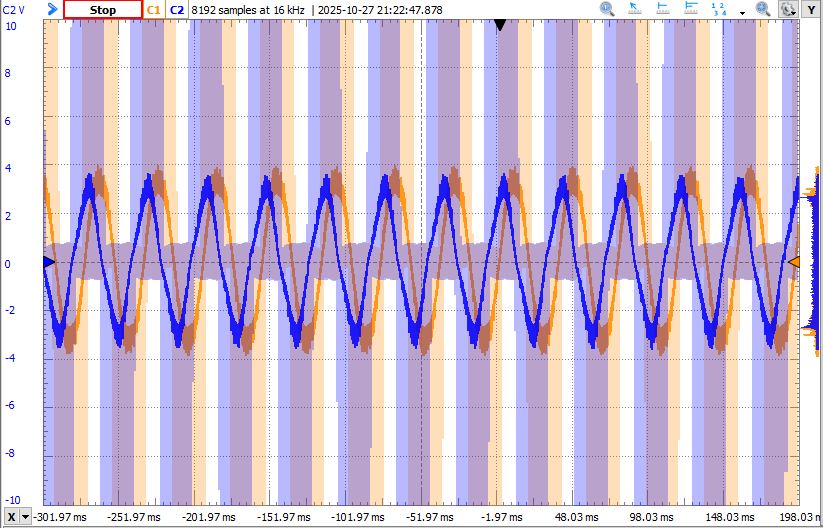
Blue: Phase W - Phase U
Orange: Phase V - Phase U

It is clear that target 6.28 rad/s makes one revolution per second.
Found my “sweetspot” at voltage_limit = 2.0 and voltage_sensor_align = 2.0. Above/below these values, the motor starts misbehaving.

  1. I verified hall-sensor. One full 360 degree rotation returns 6.28 radians from getAngle().
    There is 24 distinct steps when rotating the shaft 360 degree manually.
    I have verified that the hall-sensor sequence is correct. Also, I have verified that I get the right sensor.total_interrupts value.

  2. Tried to swap around the wiring of the motor phases. Either I’ve gotten extremely unlucky in this process, or else this is not the issue. Can anyone guide to a way of ensure (software or measure) that this is indeed correct?

Code:
.ini:

[env:disco_b_g431b_esc1]
platform = ststm32
board = disco_b_g431b_esc1
framework = arduino

lib_archive = false

monitor_speed = 115200
monitor_port = COM4

build_flags =
    -D SERIAL_UART_INTERFACE=2 # Directs Serial to USART2
    -D PIO_FRAMEWORK_ARDUINO_NANOLIB_FLOAT_PRINTF
    -D HAL_OPAMP_MODULE_ENABLED

lib_deps =
    https://github.com/simplefoc/Arduino-FOC
    SPI
    Wire
    STMicroelectronics STM32Cube HAL

main:

#include <Arduino.h>
#include <SimpleFOC.h>

float target = 0.0;

float r_pulley = 0.02; // [m]
float r_platter = 0.33/2; // [m]
float pulley_speed = (r_platter*3.490659)/r_pulley; // [rad/s]

// Hall sensor instance
// HallSensor(int hallA, int hallB , int cpr, int index)
//  - hallA, hallB, hallC    - HallSensor A, B and C pins
//  - pp                     - pole pairs

HallSensor sensor = HallSensor(A_HALL1, A_HALL2, A_HALL3, 4); // No. of poles = 8 (datasheet), so pole pairs is 4.

// BLDC motor & driver instance
// BLDCMotor motor = BLDCMotor(pole pair number);
BLDCMotor motor = BLDCMotor(4);
BLDCDriver6PWM driver = BLDCDriver6PWM(A_PHASE_UH, A_PHASE_UL, A_PHASE_VH, A_PHASE_VL, A_PHASE_WH, A_PHASE_WL);

void doA(){sensor.handleA();}
void doB(){sensor.handleB();}
void doC(){sensor.handleC();}

void serialLoop(){
  static String received_chars;

  while (Serial.available()){
    char inChar = (char) Serial.read();
    received_chars += inChar;
    if (inChar == '\n'){
      target = received_chars.toFloat();
      Serial.print("Target = "); Serial.println(target);
      received_chars = "";
    }
  }
}

void setup() {
  
  // initialise com port
  Serial.begin(115200);

  // initialise encoder hardware
  sensor.init();
  //sensor.direction = Direction::CW; // Force direction to be CW since angle increases with clockwise rotation

  //hardware interrupt enable
  sensor.enableInterrupts(doA, doB, doC);
  
  // driver config
  // power supply voltage [V]
  driver.voltage_power_supply = 24;

  if(!driver.init()){
    Serial.println("Driver init failed!");
    return;
  }
  
  // link the motor and the driver
  motor.linkDriver(&driver);

  // limiting motor movements
  // limit the voltage to be set to the motor
  // start very low for high resistance motors
  // current = voltage / resistance, so try to be well under 1Amp
  motor.voltage_limit = 2.0;   // [V]
  motor.velocity_limit = 100; // [rad/s]
  motor.voltage_sensor_align = 2.0; // restrict voltage output in calibration initFOC()
  
  motor.linkSensor(&sensor);

  // control config
  motor.torque_controller = TorqueControlType::voltage;

  motor.useMonitoring(Serial);

  motor.init();
  motor.initFOC();
  
  Serial.println("Setup done.");
}

void loop() {
  serialLoop();

  motor.loopFOC();

  motor.move(target);
}

My prime suspect for the moment is the initFOC() method. I get these logs:
MOT: Monitor enabled!
MOT: Init
MOT: Enable driver.
MOT: Align sensor.
MOT: sensor_direction==CCW
MOT: PP check: fail - estimated pp: 8.00
MOT: Zero elec. angle: 4.19
MOT: No current sense.
MOT: Ready.
Setup done.

The “zero elec. angle” is varying a bit from time to time, so do the PP check. I have seen in some videos that it is supposed to do 3-4 steps clockwise, then 3-4 steps anti-clockwise. My motor only does 3 distinct steps to one side.
I have tried to run my code several times with different preset values for direction and zero_electric_angle. Haven’t really had any luck here.

I know I’ve got at least torque control working a bit some time ago (replica of this video).
Now revisiting and spending quite some hours, no closed-loop control method works out for me. Also tried reverting to @v2.0.2 as I guess this is the FOC version used in the video.

Have I missed something obvious?
I would REALLY appreciate if anyone can point me somewhere in the right direction!

Best regards, Daniel

I would recommend:

  1. Disable monitoring. It can cause problems on STM32. One call to serial print every few milliseconds is ok, but multiple consecutive calls (as done in the monitor code) can block the CPU.
  2. Manually tune the zero angle (this is probably why your motor stalls, the auto calibration doesn’t work well for hall sensors). Command velocity higher than it’s able to reach, and adjust zero angle until both directions reach equal speed.
  3. Use SmoothingSensor. It’s in the Arduino-FOC-Drivers repository. Just declare it like SmoothingSensor smooth(sensor, motor); and pass it to motor.linkSensor(&smooth);

Any order of the motor wires and hall sequence is fine, it will be compensated for using the zero angle and sensor direction.

It can help to set motor.LPF_velocity.Tf = 0.02f; for more smoothing of the steppy velocity with hall sensors, but it also makes velocity PID less responsive so try different values (the default is 0.005). It may work better to control the speed using voltage instead of PID. Use MotionControlType::torque and adjust the target until it reaches your desired speed. It will slow down under load, so it needs to be tuned in its final running condition. The load from a turntable will most likely be constant enough that it will work ok.

Hi,

Thank you for your throughout guidelines!!

I think it’s relevant to point out that in all of the mentioned debugging steps, the motor was not loaded.

Could you please elaborate on:
2. Is this debugging description for open-loop mode?
”Higher velocity than it’s able to reach” = velocity where the motor just vibrates instead of turning?
If yes (to both), I will make a script stepping through zero angle in 0.5 degree increments.

As it is now (before applying any of your tips), it turns out the motor is actually incapable of turning backwards (guess it should so if I set move argument to a negative value)! If I turn the motor by hand, the angle readings increments as I turn clockwise. So guess I can set sensor_direction = CW to avoid calling initFOC() completely?
Then I will see how everything goes after applying filtering and hardcoding (a proper valued) zero angle offset and direction.

Yes, if you set the direction and zero angle on the motor before calling initFOC() it will skip the alignment…

Because I never use them I’m not sure how/if that would work with Hall Sensors. Usually setting a zero angle requires an absolute sensor, which the Hall Sensors are not. But the Hall Sensors are aligned to the electrical rotation so presumably it can be done. Perhaps some modulo arithmetic to ensure the zero angle chosen is inside the first electrical revolution? Or does that happen automatically?

No, the zero angle isn’t used in open loop mode.

Most of the time, auto calibration gets the zero angle close enough for closed loop to spin, and then I finetune it using the described procedure (adjust until max speed is the same in both directions). But since yours is stalling, your first step is to adjust zero angle until it spins.

And yes, once you get it running well, set zero angle and sensor direction before calling initFOC to skip calibration. I think CW is used when the sensor angle increases in the same direction as open loop, and CCW when it’s opposite. I don’t think I’ve ever had auto calibration get it wrong, but you could try both ways to make sure that’s not why it’s stalling.

Thank you so much for your good advice!!

Had this running for a little while:

void loop() {
  float zero_angle = 0;

  for (zero_angle = 0; zero_angle < 6.28; zero_angle += 0.1){
    Serial.print("Zero angle = ");
    Serial.println(zero_angle);

    motor.zero_electric_angle = zero_angle;
    motor.sensor_direction = Direction::CCW;
    motor.initFOC();

    auto start_time = steady_clock::now();

    while (duration_cast<milliseconds>(steady_clock::now() - start_time).count() < 3000){
      motor.loopFOC();
      motor.move(2);
    }
  }
}

and suddenly the motor started spinning in torque control mode!

Disabling all calls to Serial did an overall enhancement aswell.

Some follow-up questions:

  1. What is the most efficient way of monitoring velocity of my application?

  2. The velocity readings are really noisy (79 to 112, for example). I followed your step, adding a SmoothingSensor. However, for monitoring velocity, I add another wrapper around my SmoothingSensor and print the average of 100 readings or so. I guess this question now looks like the first question :smiley:

  3. Maybe this will work OK for my turntable, tuning the voltage output in torque control mode when applying my load. However, the motor vibrates and is quite noisy. Any guidance of where to fall down the rabbit-hole in order to optimize acoustic noise?
    I tried a quick run with velocity control, however, no matter the target, the motor started spinning at crazy speeds (without setting any PID parameters; maybe this is necessary … ?)
    However, I’m not sure if this is the right path to go.

Right now my code looks like this:

#include <Arduino.h>
#include <SimpleFOC.h>
#include <SimpleFOCDrivers.h>
#include <C:\Users\Bruger\Documents\PlatformIO\Projects\motor_controller\.pio\libdeps\disco_b_g431b_esc1\SimpleFOCDrivers\src\encoders\smoothing\SmoothingSensor.h>
#include <chrono>
using namespace std::chrono;

float target = 0.0;
int it = 0;

float r_pulley = 0.02; // [m]
float r_platter = 0.33/2; // [m]
float pulley_speed = (r_platter*3.490659)/r_pulley; // [rad/s]

// Hall sensor instance
// HallSensor(int hallA, int hallB , int cpr, int index)
//  - hallA, hallB, hallC    - HallSensor A, B and C pins
//  - pp                     - pole pairs

HallSensor sensor = HallSensor(A_HALL1, A_HALL2, A_HALL3, 4); // No. of poles = 8 (datasheet), so pole pairs is 4.

// BLDC motor & driver instance
// BLDCMotor motor = BLDCMotor(pole pair number);
BLDCMotor motor = BLDCMotor(4);
BLDCDriver6PWM driver = BLDCDriver6PWM(A_PHASE_UH, A_PHASE_UL, A_PHASE_VH, A_PHASE_VL, A_PHASE_WH, A_PHASE_WL);
SmoothingSensor smooth(sensor, motor);

void doA(){sensor.handleA();}
void doB(){sensor.handleB();}
void doC(){sensor.handleC();}

void serialLoop(){
  static String received_chars;

  while (Serial.available()){
    char inChar = (char) Serial.read();
    received_chars += inChar;
    if (inChar == '\n'){
      target = received_chars.toFloat();
      Serial.print("Target = "); Serial.println(target);
      received_chars = "";
    }
  }
}

void setup() {
  
  // initialise com port
  Serial.begin(115200);

  // initialise encoder hardware
  sensor.init();
  //sensor.direction = Direction::CW; // Force direction to be CW since angle increases with clockwise rotation

  //hardware interrupt enable
  sensor.enableInterrupts(doA, doB, doC);
  
  // driver config
  // power supply voltage [V]
  driver.voltage_power_supply = 24;

  if(!driver.init()){
    Serial.println("Driver init failed!");
    return;
  }
  
  // link the motor and the driver
  motor.linkDriver(&driver);

  motor.linkSensor(&smooth); // SmoothingSensor

  // limiting motor movements
  // limit the voltage to be set to the motor
  // start very low for high resistance motors
  // current = voltage / resistance, so try to be well under 1Amp
  motor.voltage_limit = 6.0;   // [V]
  motor.velocity_limit = 100; // [rad/s]
  //motor.voltage_sensor_align = 3.0; // restrict voltage output in calibration initFOC()
  
  // control config
  motor.torque_controller = TorqueControlType::voltage;
  //motor.controller = MotionControlType::velocity;
  motor.LPF_velocity.Tf = 0.01f;
  //motor.useMonitoring(Serial);
  motor.sensor_direction = Direction::CCW;
  motor.zero_electric_angle = 0.45;
  motor.init();
  motor.initFOC();
  Serial.println("Setup done.");
}

void loop() {
  motor.loopFOC();
  motor.move(2.0);
}

As said previously, you can make one call to serial print and it won’t block. Here’s my method of dealing with it: https://community.simplefoc.com/t/stepper-cogging-in-open-loop-and-sensor-issues-as5600-magnet-confirmed-to-be-correct/7720/2

SmoothingSensor is the best bet for reducing acoustic noise with hall sensors. If you’ve adjusted the zero angle and velocity Tf all you can and it’s still noisy in torque mode, then you’ll probably have to pony up and buy a high resolution sensor. Then you can use angle_nocascade mode and increment the target the way velocity_openloop does it, to eliminate all cogging effects and guarantee that the average speed is spot-on.

You may still hear some high frequency speed variation in the played audio, though. Human ears are incredibly sensitive. 50KHz PWM with synchronized 50KHz loop rate would likely shift it high enough and small enough that no human could hear it, but STM32G431 can only do 17KHz loop rate with SimpleFOC’s relatively unoptimized code in foc_current mode, or 20KHz without current sense (which is probably not needed for the relatively low speed of a turntable)

Hi again,

Alright, makes much sense that I’m starting to run into issues regarding sensoring and computational power when silent operation is preferred.

Will buy an AS5047P encoder and build a generic PCB/3d-print that will fit and see how much progress I can make with this solution.

In the meantime, I would really appreciate if you guys had some advice on alternative motor + controller solutions. It’s quite a jungle out there and would be really nice if I with my (eventual) next buy could reach something realistically dead-silent.