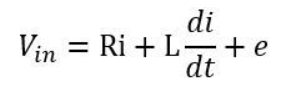
yes, that is a possibility, but mb.Hreg() returns an unsigned int which will not be null, but there might be a possibility that it returns some random big value that is messing with the calculation. so tried
If there is a possibility that modbus returns a random big value, it means that you could be hitting a limit of modbus - probably successive reading speed. I suspect you don’t really need to read the value on each loop, so one thing you could try is run it each ie 10 loops (or even more).
I appreciate it very much, When more eyes look into the problem the more chance that it could be traced.
@runger@Aleksandar_Markovic
By the way, it is not the Modbus that is causing the problem, because I tried running the motor with some random values and the problem still exists.
The motor stops spinning after a few minutes.
void loop() {
  motor.loopFOC();

  // Get a random value every 1 second
  if(millis() - currMills > 1000){
    currMills = millis();
    speed  = random(-7, 7);
  }

  motor.target =  speed; // Set target velocity
  motor.move();
}
And since it’s not a Modbus issue I can use those pins for serial debugging, so do you guys have any suggestion where I can start debugging, since I don’t have much knowledge about the arithmetic and foc theory it would be a great help.
Also, I suspect that the problem happens when there is a speed change I’ll confirm this after testing)
Ok, that’s getting more and more interesting! It also means you can remove the modbus code and use the Serial port for debug output for the moment.
Do you notice an increase in current consumption as the motor turns, before the error happens?
Does the error happen when turning the motor in either direction?
Does the error occur if you change the motor speed but without changing the motor direction, e.g. speed = random(2, 7); ?
What happens if you remove the CurrentSense from the code?
And could you post the current state of your test code including the setup() function?
@runger
This is the code that’s currently running on the STM
#include <SimpleFOC.h>

#define LED PC13    // LED pin

// BLDC motor & driver instance
BLDCMotor motor = BLDCMotor(15);
BLDCDriver3PWM driver = BLDCDriver3PWM(PA10,PA9,PA8, PB1,PB14,PB13);

// hall sensor instance
HallSensor sensor = HallSensor(PA_6, PA_7, PB_0, 15);

void doA(){sensor.handleA();}
void doB(){sensor.handleB();}
void doC(){sensor.handleC();}

void setup() {

  Serial.begin(115200);

  pinMode(LED, OUTPUT);
  digitalWrite(LED, 1); //off

 // initialize encoder sensor hardware
  sensor.init();
  sensor.enableInterrupts(doA, doB, doC);

  motor.linkSensor(&sensor); // link the motor to the sensor


  driver.voltage_power_supply = 24;
  driver.voltage_limit = 24;

  driver.pwm_frequency = 10000;

  // driver config
  digitalWrite(LED, 0); //on
  driver.init();
  motor.linkDriver(&driver); // link driver

  // set motion control loop to be used
  motor.controller = MotionControlType::velocity;
  motor.torque_controller = TorqueControlType::voltage;

  motor.PID_velocity.P = 0.2f;
  motor.PID_velocity.I = 5;
  motor.PID_velocity.D = 0;

  motor.init();
  // align sensor and start FOC
  motor.initFOC(0, Direction::CW);
  digitalWrite(LED, 1); //off
}

float speed;
unsigned long currMills;

void loop() {
  motor.loopFOC();// FOC algorithm function

  // Get a random value every 1 second
  if(millis() - currMills > 1000){
      currMills = millis();
      speed  = random(-10, 10);
  }

  motor.target =  speed; // Set target velocity
  motor.move();
}
And it happens only when the motor is changing the direction.
When using `speed = random(2, 10);` the motor doesn't stop.
And I didn't notice any current spikes or increases in current consumption.
I am also not using the current sense in the code currently.
Update
I have added code to print the Ua Ub and Uc values, and when the motor is spinning the values are as expected but when the motor stops it is printing as Nan (not a number).
So I’m guessing we have a bug in the code which happens in some situations when the motor changes direction.
We’ll have to analyse the library code, I guess a good place to start is with the HallSensor since this problem hasn’t really been reported with other sensors so far.
I am not really sure how to check if this is a hall sensor issue, but I have added some code to print the sensor.getAngle() and the sensor.getVelocity() values in the main loop and these values look fine even when the motor stops.
When the motor stops, I tried to manually rotate the motor by hand, and the values are updated as expected.
The value of angle was increasing or decreasing with respect to the direction of rotation, and the velocity value was changed when rotating.
I have also tried different FOC modulations and the result is same.
like: motor.foc_modulation = FOCModulationType::Trapezoid_120;
And I am using the Arduino framework in platformIO Vs code
Just had a thought - one thing that is special in your setup is that you have the sensor offsets set to exactly zero. That won’t be the case for many other users, who set the offset from the init routine…
I wonder what happens if you set the offset to some very small value, say 0.00001 instead of 0.0?
I hit the same issue with STM32f103c8 (blue pill), hoverboard motor with hall sensors, and 3pwm driver.
I didn’t switch direction, the motor runs for a few seconds, displaying values of motor.Ua/b/c correctly, and suddenly starts outputting nan. I tried with simpleFOC 2.1.1 and I get the same result. My PlatformIO broke after and I haven’t tried 2.1 yet (I am too lazy to read changelogs to see where you had MCU and Hall changes so I’ll test the versions randomly when I get the PlatformIO back to life).
I align the motor through a normal init routine.
I am feeding motor.move function with a non-changing variable (1.0f).
I lowered the PWM frequency from 5k to 1k and nans appear much later it seems - I left it running with @Adharsh_K random code, and it did throw nan after a few minutes.
@runger the problem seems present only with motor.foc_modulation = FOCModulationType::SinePWM;
I am not positive, I have not debugged this, just by testing and a bit of imagination. Motor motor.Ua/b/c are calculated in BLDCMotor::setPhaseVoltage and the default modulation type is SinePWM so I tried SpaceVector and it works for 10 min.
@runger,
As you have suggested I have tried using motor.initFOC(); to automatically set the senor offset and print the motor.zero_electric_angle and then run the motor.
The value was 0.00000000, and the motor stopped after a few minutes.
I have also tried setting it to motor.initFOC(0.00001, Direction::CW); and I didn’t notice any difference.
Hi @wespion.control
Thank you for your response and interest in this issue.
That is a possibility but in this particular situation, it was because the board didn’t have any shoot-through protection before, so on startup the full-bridge MOSFETs were acting as a short circuit from VCC to ground, and as soon as the driver ic have been replaced with IR2104, the inrush issue was solved.
UPDATE
I was printing the values of voltage.q and electrical_angle in BLDCMotor.cpp on line #318 just before calling the function setPhaseVoltage(voltage.q, voltage.d, electrical_angle);
So then I tried printing the values of shaft_velocity_sp, shaft_velocity and current_sp
and the shaft_velocity, and when the motor stops the shaft_velocity was becoming ‘inf’ thus making current_spnan
Funny thing is that I left SpaceVectorPWM modulation running yesterday for more than 20 min without any issues, and it throws NaN today after only a few seconds of running the motor.
(after that the getVelocity() function works fine even after the motor stops)
so I guess something to do with the hall sensors and the getVelocity() function.
Also, I have noticed that there is a check to see if Ts is 0 ie:
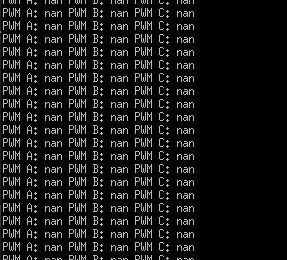
 , the motor was stoping with all the three modulation types.