Hey @schoch
This is a very interesting application and I would be very happy to see your results.
I would not use the voltgae_limit for this kind of application. Here is a very simple code that works pretty well for me. I am not sure if it is what you were searching for:
#include <SimpleFOC.h>

// BLDC motor & driver instance
BLDCMotor motor = BLDCMotor(11);
BLDCDriver3PWM driver = BLDCDriver3PWM(5, 10, 6, 7);

// encoder instance
Encoder encoder = Encoder(2, 3, 500);

// Interrupt routine intialisation
// channel A and B callbacks
void doA(){encoder.handleA();}
void doB(){encoder.handleB();}

void setup() {

  // initialize encoder sensor hardware
  encoder.init();
  encoder.enableInterrupts(doA, doB);
  // link the motor to the sensor
  motor.linkSensor(&encoder);

  // driver config
  // power supply voltage [V]
  driver.voltage_power_supply = 12;
  driver.init();
  // link driver
  motor.linkDriver(&driver);

  // set motion control loop to be used
  motor.controller = ControlType::voltage;

  // use monitoring with serial
  Serial.begin(115200);
  // comment out if not needed
  motor.useMonitoring(Serial);

  // initialize motor
  motor.init();
  // align sensor and start FOC
  motor.initFOC();

  Serial.println("Motor ready.");
  _delay(1000);
}

// haptic attraction controller - only Proportional
PIDController P_haptic{.P=10,.I=0,.D=0,.output_ramp=100000,.limit=12};
// attractor angle variable
float attract_angle = 0;
// distance between attraction points
float attractor_distance = 45*_PI/180.0; // dimp each 45 degrees

float findAttractor(float current_angle){
  return round(current_angle/attractor_distance)*attractor_distance;
}

void loop() {

  // main FOC algorithm function
  motor.loopFOC();

  // Motion control function
  motor.move(P_haptic(attract_angle - motor.shaft_angle));

  // calculate the attractor
  attract_angle = findAttractor(motor.shaft_angle);
}
I would suggest you to create your own control loop using the PIDController class and you in it use only the proportional value P. This will give you a linear feedback, which seems good to me 
The haptic texture will be something like this:
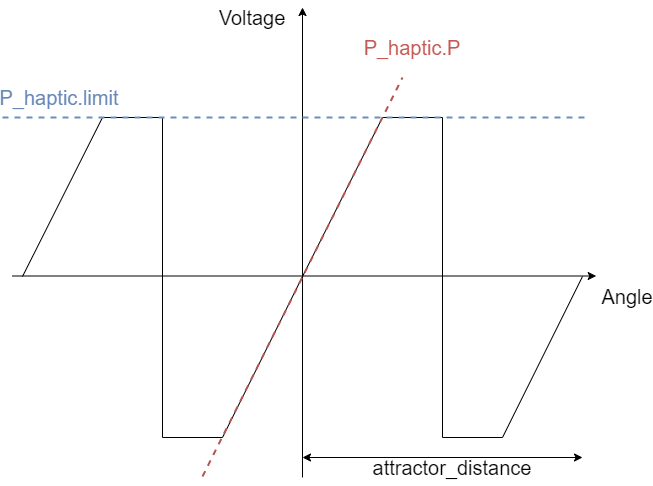
It is defined by the slope P_haptic.P and the voltage limit in the P_haptic.limit. And in the case of my code the switching in between the attraction points is done exactly in the midle of the two attractor_distance/2.
This is a very simple code though. I am sure you can do it much better