Connection example
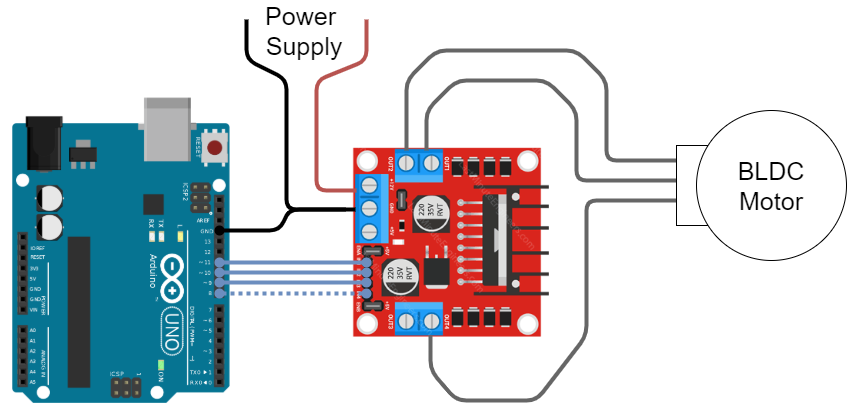
Here is the connection diagram.
- Connect the motor to the motor to the 3 out 4 outputs of the L298N
Example:OUT1- motor phaseAOUT2- motor phaseBOUT3- motor phaseC
- Connect the
IN1,IN2,IN3andIN4to the Arduino. Make sure to connect the theINxports with the same number asOUTxports to the PWM pins. Example:IN1-11IN2-10IN3-9IN4-8(doesn’t have to be pwm) - can be connected to GND directly
- Make sure that both
ENAandENBareHIGH.- On my board I have on both sides two pin jumper which does exactly this.
- If you don’t have it, connect
ENAandENBto digital pins and set them toHIGH(or connect them to5Vpin directly)
- Connect the common ground of the MCU and L298N
- Connect the power supply
- Connect your sensor and everything else you will need for your FOC application - steps after step5. are no longer L298N specific.
Code Example
Now you can run any BLDCDriver3PWM example out there with this setup. Just make sure to either connect the IN4 to the ground directly or in the setup() function add:
pinMode(8,OUTPUT);
digitalWrite(8,LOW);
Here is the open loop example code:
// Open loop motor control example for L298N board
#include <SimpleFOC.h>

#define IN1 11
#define IN2 10
#define IN3 9
#define IN4 8

// BLDC motor & driver instance
// BLDCMotor motor = BLDCMotor(pole pair number);
BLDCMotor motor = BLDCMotor(11);
// BLDCDriver3PWM driver = BLDCDriver3PWM(pwmA, pwmB, pwmC, Enable(optional));
BLDCDriver3PWM driver = BLDCDriver3PWM(IN1, IN2, IN3);

void setup() {
  // deactivate the OUT4 output
  pinMode(IN4,OUTPUT);
  digitalWrite(IN4,LOW);


  // driver config
  // power supply voltage [V]
  driver.voltage_power_supply = 12;
  driver.init();
  // link the motor and the driver
  motor.linkDriver(&driver);

  // limiting motor movements
  motor.voltage_limit = 3;   // [V]
  motor.velocity_limit = 20; // [rad/s]

  // open loop control config
  motor.controller = ControlType::velocity_openloop;

  // init motor hardware
  motor.init();

  Serial.begin(115200);
  Serial.println("Motor ready!");
  _delay(1000);
}

float target_velocity = 2; // [rad/s]

void loop() {
  // open loop velocity movement
  // using motor.voltage_limit and motor.velocity_limit
  motor.move(target_velocity);

}