# Haptic textures
**URL:** https://community.simplefoc.com/t/haptic-textures/301
**Category:** applications
**Created:** [December 4, 2020, 2:01pm UTC](https://community.simplefoc.com/t/haptic-textures/301 "2020-12-04T14:01:30Z")
**Posts on this page:** 1
**Showing post:** 4
### Author:  [@Antun\_Skuric](https://community.simplefoc.com/u/Antun_Skuric)
#### Post date: [December 5, 2020, 11:25am UTC](https://community.simplefoc.com/t/haptic-textures/301/4 "2020-12-05T11:25:05Z")
Hey @schoch
This is a very interesting application and I would be very happy to see your results.
I would not use the `voltgae_limit` for this kind of application. Here is a very simple code that works pretty well for me. I am not sure if it is what you were searching for:
```cpp
#include
// BLDC motor & driver instance
BLDCMotor motor = BLDCMotor(11);
BLDCDriver3PWM driver = BLDCDriver3PWM(5, 10, 6, 7);
// encoder instance
Encoder encoder = Encoder(2, 3, 500);
// Interrupt routine intialisation
// channel A and B callbacks
void doA(){encoder.handleA();}
void doB(){encoder.handleB();}
void setup() {
// initialize encoder sensor hardware
encoder.init();
encoder.enableInterrupts(doA, doB);
// link the motor to the sensor
motor.linkSensor(&encoder);
// driver config
// power supply voltage [V]
driver.voltage_power_supply = 12;
driver.init();
// link driver
motor.linkDriver(&driver);
// set motion control loop to be used
motor.controller = ControlType::voltage;
// use monitoring with serial
Serial.begin(115200);
// comment out if not needed
motor.useMonitoring(Serial);
// initialize motor
motor.init();
// align sensor and start FOC
motor.initFOC();
Serial.println("Motor ready.");
_delay(1000);
}
// haptic attraction controller - only Proportional
PIDController P_haptic{.P=10,.I=0,.D=0,.output_ramp=100000,.limit=12};
// attractor angle variable
float attract_angle = 0;
// distance between attraction points
float attractor_distance = 45*_PI/180.0; // dimp each 45 degrees
float findAttractor(float current_angle){
return round(current_angle/attractor_distance)*attractor_distance;
}
void loop() {
// main FOC algorithm function
motor.loopFOC();
// Motion control function
motor.move(P_haptic(attract_angle - motor.shaft_angle));
// calculate the attractor
attract_angle = findAttractor(motor.shaft_angle);
}
```
I would suggest you to create your own control loop using the `PIDController` class and you in it use only the proportional value `P`. This will give you a linear feedback, which seems good to me 😃
The _haptic texture_ will be something like this:
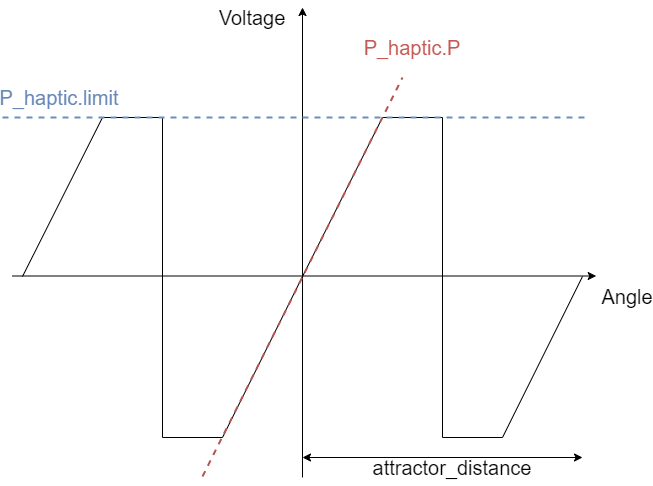
It is defined by the slope `P_haptic.P` and the voltage limit in the `P_haptic.limit`. And in the case of my code the switching in between the attraction points is done exactly in the midle of the two `attractor_distance/2`.
This is a very simple code though. I am sure you can do it much better 😃
---
_[View the full topic](https://community.simplefoc.com/t/haptic-textures/301)._